Dual Enrollment FAQs
Northampton Community College

Welcome to the College Connections Dual Enrollment FAQ page!

We know the process can feel overwhelming, so we’ve gathered the most common questions students ask about applying, registering, and succeeding in their courses. If you don’t see your question here, the College Connections Team is always happy to help.  

How do I get started with dual enrollment at NCC?

Begin by checking with your school counselor or homeschool evaluator for approval, and then follow the steps found on our website.

Email dualenrollment@northampton.edu with your full name, graduation year, NCC ID (included in your acceptance email), name of your HS, and let us know of this error, and we will assist you in correcting it.

  • You will receive your acceptance email shortly after submitting your application, followed by an email containing your Workday student login information. This email will come from support@northampton.edu (SUBJECT LINE: ACCESS YOUR NCC ACCOUNT NOW) and will be sent to the email used to complete your application.
  • This email will contain your Student ID, NCC Email, Username, and Live Link. This link will expire in 14 days! Click the Link to set up your account immediately!
    • Follow the prompts to log in and set up your account
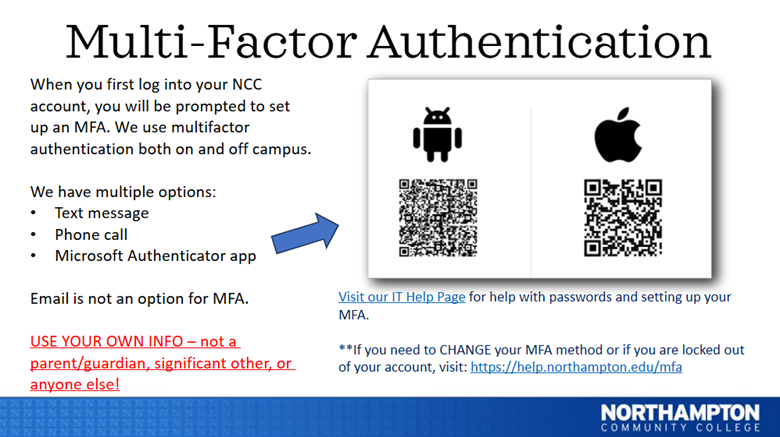
    • Follow the prompts to set up MFA (Multi Factor Authentication)
      • We recommend using the text message option
  • Remember to save the password so you can log into your Workday student portal on all your devices. If you do not receive this email, please contact helpdesk@northampton.edu / 610.861.5413 (check your spam/ junk folder first).

Our current tuition and cost information for Dual Enrollment is listed here.

  • A limited number of dual enrollment scholarships are available each semester. Preference will be given to students who receive free/reduced lunch and/or are first-generation college students.
  • Students must fill out the scholarship application for each semester they are registered for a class
  • Students must be registered for a class before they apply for the scholarships here
  • Out-of-County/Country students are not eligible to receive the dual enrollment scholarship

Federal Financial Aid is only available to high school graduates. Students should begin applying for Financial Aid before May 1 during their senior year.
I’ve completed my application and received my acceptance email. Now what?

The parent/guardian who is overseeing the homeschooler can sign for the school counselor. Please provide any transcripts that you may have. Home-schooled students should sign up for the NCC Placement Evaluation for English and/or Math here to assist with placement in college courses (as a transcript is reviewed).

  • Yes! ALL NCC students must complete an online orientation (OP1) before registration. Dual Enrollment students can sign up for Dual Enrollment-specific orientation session here
  • If the DE orientation sessions do not work for your schedule, you can attend the general orientation (OP1). Available dates can be found here
  • Orientation reviews NCC student services, how to log into your Workday student portal, how to register for your classes, and much more.

  • The college uses multiple measures to determine student placement in English and Mathematics classes. Student placement will be determined by high school transcript review.
    • English: Students receive a notification in their Workday student account if they are college English eligible. If a student does not meet the requirements, they will be required to take the English Pathfinder Placement assessment before course registration. Learn more here
    • *Students are required to have a cumulative high school GPA of 3.0/83% to be English 101 ready (See suggested courses below)
    • Math: College math requirements depend on a student’s career pathway so that placement can vary. At NCC, most students begin with College Algebra or Introductory Statistics. Placement is determined by reviewing the highest-level high school math course completed in the last two years, along with the grade earned.
      • To place directly into College Algebra or Introductory Statistics, students need to have completed, during their junior or senior year:
        • Algebra 2 with a B or higher, OR
        • Algebra 3 or Precalculus with a C or higher.
      • Students who do not meet these requirements will take the Math Pathfinder Placement assessment to determine the best starting course Learn more here

  • The NCC website offers a general list of available courses here.
  • Course scheduling and registration will be done in your Workday student portal after all application steps have been completed. Workday is where the most up-to-date course information can be found.


Where Do I Get Tech Help?

  • If it’s been over 2 business days since completing your application and you have not received your Student portal login information from support@northampton.edu, (SUBJECT LINE: ACCESS YOUR NCC ACCOUNT NOW)

Use the reset password link here.


  • Your Username is the NCC student ID found in your acceptance email


  • Many schools allow dual enrollment students to continue to use high school-issued technology. NCC does not offer laptops or personal tablets to students; however, several on-campus areas have computer labs for student use: northampton.edu/student-experience-and-support/library/
  • Please note, HS issued Chromebooks and iPads may not allow access to platforms needed for some courses. You MUST contact your school's IT team to resolve it immediately!

Yes, please visit the NCC Help Desk website here.

  • If you are using a school issued Chromebook or iPad, see above

Access your NCC school email through NCCGo under Microsoft Suite/ Office 365.


For assistance accessing email, contact NCC's Help Desk.

Please visit the NCC IT Website for more information.


Image of how to set up MFA


Dual Enrollment Multi-Factor Authentication set up: Download MFA Set up Instructions (PDF)

I’ve completed all the application steps. How Do I Register for Classes?

Now that you’ve completed your application, submitted your FERPA form and transcript, completed orientation and tasks in your Workday student portal, you can register for your college class!

*Before registering for a course, please speak with your high school counselor. Each school has its own process and/or course options.

  • We recommend first-time dual enrollment students start with one course in the regular 14-week semester (not an accelerated semester)
    • Fall begins in August, Spring begins in January, Summer begins in May

  • This may mean you are missing an application step, such as FERPA, Transcript, Orientation, or an Onboarding task.
    • Check your Workday student portal for notifications and holds
  • You may not be eligible for the course.
    • Certain classes require students to have a cumulative GPA of 3.0/83% to enroll. If not, placement evaluation is required.
    • After a transcript is received and processed, students are notified in their Workday student portal.
    • Placement evaluation, testing exemptions, and course requirements can be found here.


Northampton Community College offers courses to fit your life and learning style. Courses are available in various lengths and formats, allowing you to select the best options for your schedule. Learn more about course formats here.

  • Start by speaking with your high school counselor. Some schools require students to select from a list of approved courses
  • The Department of College Connections recommends taking general education courses that fit into NCC programs and majors and are highly transferable:
    • English I (ENGL101)*
    • English II (ENGL151)**
    • Intro to Psychology (PSYC103)*
    • Principles of Sociology (SOCA103)*
    • Intro to Communication (COMM101)
    • History
    • College Success***

*Students are required to have a cumulative GPA of 3.0/83% to enroll or take the placement test to see if they are eligible

**Must take ENGL101 prerequisite before English II

***Required for students earning an NCC degree and should be taken while taking another college-level course


  • The college uses multiple measures to determine student placement in English and Mathematics classes. Student placement will be determined by high school transcript review.
    • English: Students receive a notification in their Workday student account if they are college English eligible. If a student does not meet the requirements, they will be required to take the English Pathfinder Placement assessment before course registration.

 *Students are required to have a cumulative high school GPA of 3.0/83% to be English 101 ready (See suggested courses below)

  • Math: College math requirements depend on a student’s career pathway so that placement can vary. At NCC, most students begin with College Algebra or Introductory Statistics. Placement is determined by reviewing the highest-level high school math course completed in the last two years, along with the grade earned.
    • To place directly into College Algebra or Introductory Statistics, students need to have completed, during their junior or senior year:
      • Algebra 2 with a B or higher, OR
      • Algebra 3 or Precalculus with a C or higher.
    • Students who do not meet these requirements will take the Math Pathfinder Placement assessment to determine the best starting course.

Yes! Information and application here.

  • YES! Official AP/IB test scores can be used for college credit as a testing exemption and to fulfill a course prerequisite. Students must submit their Official test scores from the College Board (AP) or the International Baccalaureate (IB)
  • AP / IB tests and score requirements found here.
  • Official test scores must be submitted to transcripts@northampton.edu - Please allow 7-10 days for processing
  • Questions, contact NCC Prior Learning Assessment Office


Before adding or dropping a class, check the academic calendar for add/drop/withdrawal/refund dates


AND Check with your high school counselor if using the college course for high school graduation credit


Classes can be added and/or dropped in your workday student portal>academics
Download How To (PDF)

Guidance Counselor FAQs

Are you a school counselor with questions about Dual Enrollment? Visit our Guidance Counselor FAQ page to learn more about the dual enrollment advantage, supporting student success, getting students started with dual enrollment, and find other helpful resources that are available to both you and your students.

Parent and Student Support Services FAQs

Parents, your child must use their own NCC email when contacting the school or their professor. If you have any questions, please email collegeconnections@northampton.edu

  • NCC uses Brightspace learning management system. Students can access their course pages on Brightspace about 3 days before each course's start date. Open Brightspace and log in using your NCC credentials (the same username/password you use for Workday).
  • NBrightspace access can be found on the NCCgo page (Student Logins)

  • Most professors will update their grades on Brightspace. If you do not see your grades in Brightspace, please review your syllabus and contact your instructor.
  • Mid-semester, you will receive a progress update if you are in a 14-week semester section. These will be sent to your student email. If you receive a U grade or mid-semester progress report, please reach out to your instructor.
  • Professors send flags, referrals, and kudos through Starfish. This is direct communication from your instructor. Please get in touch with your instructor if you have any questions.
  • Final grades are available in Workday at the end of the course

  • Final Grades will be sent to the high school counselor
  • Have your child open their course in Brightspace to see their current grades.

Dual Enrollment students have access to all student services at the college, such as the learning center, counseling, academic advising, student life, and more. Visit here for more information.

  • All accommodations must go through the Accessibility Resource Center (ARC).
  • High school accommodations do not carry over to college. Appropriate accommodations for students with disabilities are determined on an individual, case-by-case basis through the interactive Pre-Service meeting, appropriate documentation, and the impact of the disability in the academic environment.

Students must first talk to their professor


  • Make sure you are using your NCC email (not personal email, Workday, or Brightspace) to communicate with your professor electronically.
  • If you are unable to resolve the issue, please reach out to your academic advisor, Heather Watt, hwatt@northampton.edu who can help you connect to the academic Dean.
    • Please know that these meetings are confidential. The Dean will work with you to find the best solution.

Use this form if you have a non-academic concern or complaint.

Yes. At the end of each semester, final grades will be shared with counselors in each of our sponsoring school districts.

The school district approves this. Some schools offer specific courses for dual credit (high school and college credit); others do not. Please speak to your high school counselor.

Many courses now use digital resources that are included in your course and available in Brightspace. Other courses may require an access code or a physical copy. Don't hesitate to get in touch with the NCC Bookstore for more information.

How To Be A Successful Student!

If you have any questions, please contact collegeconnections@northampton.edu

Every class will provide a syllabus that outlines class expectations. Students should review the syllabus to understand the grading process and timeline of the class. This helps students manage their time and turn assignments in on time which is required.


NCC Attendance Policy

  • The college calendar does not follow the high school calendar. Students must follow the NCC academic calendar and are encouraged to review the calendar and important dates prior to the start of the semester.
  • If a student needs to change/add/drop/ or withdraw from a course, they must do so by the dates set forth by NCC.

  • Academic Advising: Students can work with their assigned dual enrollment advisor, Heather Watt, to map out an academic plan to meet their goals, (hwatt@northampton.edu) or utilize NCC’s walk-in advising in-person or virtually.
  • Grading and Email: Students should check their grades in BrightSpace and their NCC email account several times a week to stay informed on their progress and keep up to date with NCC events and important information.
  • Tuition: Please review the dual enrollment tuition and fees prior to course registration.
  • Dual Enrollment Scholarships available. More information here:

Students looking at laptop
Dual Enrollment Info Sessions

If you're interested in learning more about Dual Enrollment, join us for an upcoming online info session!

Learn More
students hanging out
Dual Enrollment Registration Sessions

Our Virtual Registration Sessions are small group zoom sessions where students/families can ask questions and troubleshoot any registration concerns. 

Sign-Up
Student at laptop
Dual Enrollment Helpful Videos

Check out our series of how-to videos to walk you through some of the NCC processes and systems.

Start Watching

Next Steps

With 120+ high-quality programs at a highly affordable cost, you can build specialized skills to advance in your career path — fast. And with flexible class formats and convenient locations, it's never been easier to join us.